
Why CloudWatcher is ideal for home observatories
Unlike a general weather station, the CloudWatcher measures what matters to astronomers: cloud cover (via infrared sky temperature), rain presence, darkness level, wind speed, ambient temperature and humidity. These are the parameters that determine whether you can observe safely tonight, and whether your dome should stay open.
Straightforward to install
Mount it outside, run the weatherproof cable to your observatory PC's RS232 serial port, and install the software.
Works with your software
ASCOM, INDIGO, INDILib, TheSkyX, ACP, MaxIm DL and more. All drivers are free.
Built-in relay output
Directly trigger a dome or roll-off roof via the relay, with no additional hardware needed for basic automation.
Always on, always watching
Runs 24/7 in your observatory. Sensors are designed for continuous outdoor exposure, not occasional spot readings.
Straightforward to set up, serious in operation
The CloudWatcher connects to your observatory PC through its RS232 serial port. The free Windows software displays all sensor readings in real time and lets you configure the thresholds for SAFE/UNSAFE decisions. The ASCOM driver then makes those decisions available to any compatible automation platform.
For Linux and macOS users—and for setups running INDI or INDIGO—native drivers are available. There is no need to run a Windows emulation layer.
Getting alerts when you're not watching the screen
If your observatory is just a few meters away…
Imaging in your backyard often means you're indoors, or even in bed, while the session runs overnight. CloudWatcher software can display alerts and send push notifications to your phone. But there is also a low-tech solution that many users swear by.
Low-cost weather alerts with walkie-talkies
A simple way to go to sleep with peace of mind (well, some…) is to use a pair of low-cost walkie-talkies with «vox» function, and place one of them (probably in its charging cradle) in front of the observatory computer loudspeaker, taking the other unit with us to bed. Thanks to the vox function, the remote unit will activate when the PC warns us of changing weather conditions.
Swapping units each night will keep the batteries in good shape.
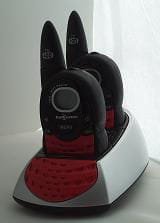
Thank you Antonio (Fernández this time 🙂) for this tip!
Safety first—even on clear nights
Clouds can roll in quickly, especially in summer. A well-configured CloudWatcher will close your dome before you would notice conditions had changed. The key thresholds to configure are:
- Cloud sensor temperature delta—how much colder the sky needs to be than ambient for a SAFE reading
- Rain sensor sensitivity—detect rain immediately, before significant precipitation begins
- Wind speed limit—close the dome when wind exceeds your mount's tracking tolerance
Once these thresholds are set, the CloudWatcher makes SAFE/UNSAFE decisions autonomously. Your automation software acts on them. You sleep.