
The problem with power cuts
Being able to react on time is critical if the power fails. No wonder some battery backup (UPS) is needed, but in many cases it is not enough to just keep the session going, so some actions must be started.
The Dragonfly can launch a macro (and/or script) when a sensor changes state, so all it needs is something that tells it the mains has gone.
Check the UPS first
Some UPS models already have the relay built in and bring it out as a dry contact. If yours does, wire that contact to any «Sensor IN» on the Dragonfly and you are done—there is nothing to buy and nothing else to wire.
How the detection works
If the UPS has no dry contact, a small relay module does the same job. It is powered at 12 V DC from a cheap mains adaptor, and that adaptor goes outside the UPS (unprotected!). While there's power, the contact of the relay will remain closed, but if power fails, it will immediately open.
Now wire the relay's contact terminals to any of the Dragonfly's inputs, and it will detect when the power goes off. As you already know, a macro (and/or script) can be launched if one sensor goes off; you can use it to take any appropriate actions.
It must be a mechanical relay, not solid-state. A solid-state relay will not work in this circuit. This module is a suitable one: 12 V, one channel, with optocoupler isolation.
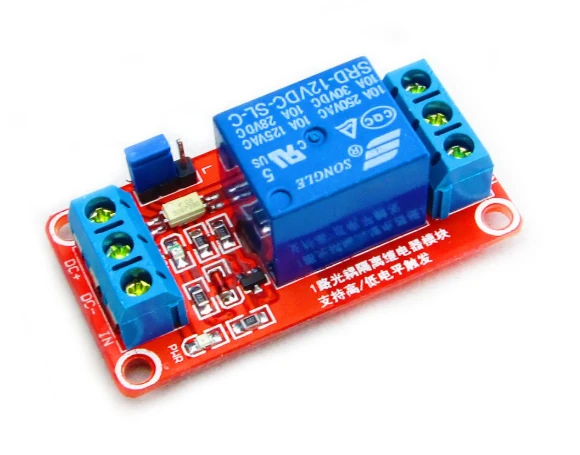
Wiring the relay module
- DC+ and DC− to the 12 V adaptor. The adaptor goes in an unprotected outlet, not one backed by the UPS. This is essential: if the relay is on the UPS, it won't open when mains fails. Watch the polarity—DC+ and DC− are not interchangeable.
- A short wire from IN to DC+. The relay has to stay energised for as long as the adaptor has mains, and the IN terminal is what holds it there. Plug the adaptor in and listen: the relay clicks. If it does not, your module is jumpered for a low-level trigger—move that wire from IN to DC− and it will pull in. Do not go by the PWR LED: that one only tells you the module has power, not that the relay has closed.
- The contact terminals to any «Sensor IN» on the Dragonfly, using the pair that is closed while the relay is energised.
- The macro. Set up a macro (and/or script) to be launched when that sensor goes off. The reference is in the Dragonfly Macros Manual.
Note: the Dragonfly itself stays on the UPS-backed side of the installation—only the relay's little power adaptor goes on the unprotected outlet.