
What the watchdog does
One of the things the Dragonfly can do to help is reset your PC if it becomes unresponsive while running the Dragonfly's software.
The Dragonfly includes a series of commands to act as an automata—performing preprogrammed actions in certain situations, in response to triggers. We can define some «actions», also some «triggers», and associate them (even several actions to one trigger). This can be considered advanced, but we can help with specific instructions for each case.
Hardware wiring
It goes without saying (!) you have to wire the reset button of the computer to one of the Dragonfly's relays—use the last one to match this example and the files below.
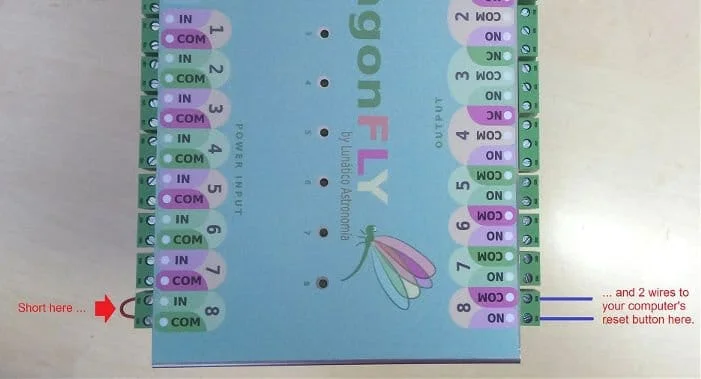
How it works
When launched, on first communication with the Dragonfly, the Windows program will read a file (initcmds.ini) and send all commands in there to the Dragonfly. When closed, it will do the same with another file (endcmds.ini).
It is important here to notice that from the point of view of the Dragonfly, the PC will become irresponsive (and thus will be reset) if it has no communication with the Windows program for a specified period of time.
initcmds.ini and endcmds.ini
In the first file we set up the watchdog to use the last relay as the computer reset button:
!trig delete 0#
!action delete 0#
!trig wdogcr 120000#
!action add_relio_rlpulse_1_7_2000#
!action tadd 0 0#
and in the second file we disable it:
!action tdel 0#
!trig delete 0#
!action delete 0#
… there are more detailed explanations in each file.
To proceed, just copy the files (both «.ini» files) found in the accompanying zip file into the Dragonfly installation folder (c:\program files …\dragonfly).
Testing it
The failure detection relies on the communication between the Dragonfly and the Dragonfly's PC program, and the watchdog will be deactivated upon gracefully closing the program. So one way to test the system is to «kill» (using the task manager for instance) the Dragonfly program so it won't deactivate the watchdog. Removing the network cable will do, too.
Three last details
- The watchdog, as is, is programmed to trigger after 120 seconds of no communication (that's the
120000in the 3rd line). - It will operate relay number 7 (the
7in…rlpulse_1_7_2000—this is the last relay!) and for 2 seconds (2000 ms, the2000in that very same line). - The
1in that line…_rlpulse_1_…has no meaning in the Dragonfly (but is useful for older Fireflies).
Relay number, pulse duration and watchdog period can be easily changed in the «initcmds.ini» file.
IMPORTANT: here relays are numbered 0 to 7. So 7 means the last relay (8) of your Dragonfly.